
AI Music MCP
for your AI assistant.
AIGenMusic is a hosted AI music MCP server. Connect your AI assistant to private songs and instrumentals through the Model Context Protocol, using your existing account and credits.
Private-generation plan · 13 credits per generation · Client setup required
A warm piano and acoustic guitar theme for a quiet morning. Instrumental, gentle drums, no vocals.
- Review the idea and quote13 credits · private music
- Follow one music taskKeep its task ID if you disconnect
- Take the ready file into your projectListen in Library, download permitted files
Illustrative workflow. This page does not submit a generation.
A music brief. A playable result.
One completed production MCP test, from the original brief through file delivery. Listen to a permitted excerpt of its first track.
The brief
A gentle instrumental sunrise theme with warm piano, soft acoustic guitar, mellow bass and light brushed drums. Calm uplifting mood, a clear melodic motif and a gentle ending. No vocals.
Verified 10 November 2026 · MCP SDK test
First Light Window
30-second excerpt · Full example track 3:02
- Quoted and used
- 13 credits
- Delivered in this run
- 2 MP3 tracks
- Playback & full downloads
- Verified in the production test
The excerpt is shared with permission. The full tracks remain private. Output count and duration can vary. This generation was tested with the MCP SDK; Claude Code connectivity was checked separately.
Keep the music brief with your project.
Use the assistant you are already working with to prepare the music request, read the price and collect a ready file. Your website account, credits and Library stay connected.
| What you are doing | A useful starting point | How it fits |
|---|---|---|
| Creating and listening by hand | Website studio | Work directly in the music interface and use the available editing tools. |
| Building a project with an AI assistant | Music MCP | Give the assistant a music brief, follow its task and bring the audio into your project. |
| Delegating within a clear allowance | Music MCP | Give this connection its own permissions, expiry and credit limits. |
| Using tools beyond this MCP beta | Website studio | Open the corresponding website tool. This MCP currently focuses on new music generation and delivery. |
Explore the browser tools: Text to Song for a written brief, or AI Instrumental Generator for music without vocals.
Start with the job your music needs to do.
Adapt one of these text briefs to your project. Each new generation has its own quote; editing and timing remain in your project tools.
Small games
Give a playful puzzle scene its own sound: curious melodies, warm synths and a light rhythm that leaves room for the game.
Bring it into your work
Download a permitted audio file and place it in your game project. Trim and loop it in your own editor when needed.
Build a short retro loop directly in the browser with 8 Bit Music Maker
A prompt to adapt
Prepare a quote for an instrumental soundtrack for my cozy puzzle game. Warm electronic textures, curious melodies, light percussion and a calm mood. No vocals. Tell me the price before submitting.
Product videos
Keep the message in front. A restrained instrumental can support a walkthrough while leaving space for narration.
Bring it into your work
Bring the ready audio into your video editor. Align it with your cut and adjust levels around the voiceover.
A prompt to adapt
Prepare an instrumental music quote for a friendly product walkthrough. Light piano, soft percussion, a warm optimistic mood and a sparse arrangement under narration. Review the price with me first.
Podcasts
Set a recognizable tone for a thoughtful conversation: a steady pulse, a simple motif and no competing vocals.
Bring it into your work
Save the file in your production folder, then edit an intro or a background bed in your audio editor.
A prompt to adapt
Quote a warm instrumental theme for a thoughtful weekly podcast. Mellow guitar, subtle bass and minimal percussion. Keep the melody uncluttered and leave room for speech. Show the quote before generating.
Music generation through MCP
This beta has a focused path: account details, a generation quote, one submitted task and the files that become available for that task.
- Songs and instrumentals
- Describe the sound, add a title and styles, and choose whether you want an instrumental.
- A price before generation
- See the quoted credits, privacy, retention and license before committing within your allowance.
- A task you can return to
- Keep the same task ID through waiting or a disconnected session.
- Ready files and your Library
- Find your music in Library and use the permitted original or preview links returned with the task. File access follows account rights.
Uploads, covers, extensions, stems and custom-lyrics editing are outside this MCP beta. Use the corresponding website tools for those workflows.
Open your LibraryConnect an AI assistant to the music MCP server
Choose your client below. ChatGPT uses a browser authorization flow; coding clients can use OAuth or a dedicated credential. Availability depends on your client and account.
Before a music generation
- An account you can sign in to
- An AI client with custom MCP support
- Private-generation plan rights
- At least 13 account credits for one generation
You can create a read-only connection and check your account without generating music. To add generation permissions later, create a new connection with the appropriate allowance.
ChatGPT
ChatGPT connects through OAuth 2.1. A custom MCP/plugin setup must be available in your account or workspace; the account owner or administrator controls access.
- Open the custom MCP/plugin setup in ChatGPT. Your account may need developer mode or workspace administrator approval.
- Add a server named AIGenMusic with the URL below. Choose OAuth and dynamic client registration (DCR) if the setup asks; do not paste a dedicated connection credential into ChatGPT.
- When the client opens AIGenMusic, sign in and review the callback domain, permissions, expiry and spending limits. Approve only the access you want to delegate.
- Select the music tools in your client and start with the account check below. Generation needs private-generation rights, credits and permission.
https://aigenmusic.com/api/mcp
Claude Code
Use a project .mcp.json file. Start Claude Code in that project, approve the project server if prompted, then open /mcp to connect and authorize.
- Save this configuration, merging the music server with any existing entries. Reload or start the server in your client’s MCP settings.
- When the client opens AIGenMusic, sign in and review the callback domain, permissions, expiry and spending limits. Approve only the access you want to delegate.
- Select the music tools in your client and start with the account check below. Generation needs private-generation rights, credits and permission.
{
  "mcpServers": {
    "music": {
      "type": "http",
      "url": "https://aigenmusic.com/api/mcp"
    }
  }
}Use a dedicated credential instead
Create a dedicated connection on AIGenMusic and save its credential once. Keep the environment placeholder in this file. Fully quit and relaunch the client from the terminal where the variable is set; an already running app may not inherit it.
Open AI connections{
"mcpServers": {
"music": {
"type": "http",
"url": "https://aigenmusic.com/api/mcp",
"headers": {
"Authorization": "Bearer ${AIGENMUSIC_MCP_TOKEN}"
}
}
}
}Run this first command, paste your saved credential when the terminal waits, then press Enter. The input is hidden.
read -s AIGENMUSIC_MCP_TOKEN
After entering the credential, run this next block in the same terminal. Start the client from your project folder.
export AIGENMUSIC_MCP_TOKEN
claude
Codex
Add the music server to your Codex configuration. The same MCP configuration is used by the CLI and supported Codex app surfaces.
- Save this configuration, merging the music server with any existing entries. Reload or start the server in your client’s MCP settings.
- After saving the configuration, run codex mcp login music to complete OAuth. The CLI shows the browser authorization URL.
- When the client opens AIGenMusic, sign in and review the callback domain, permissions, expiry and spending limits. Approve only the access you want to delegate.
- Select the music tools in your client and start with the account check below. Generation needs private-generation rights, credits and permission.
[mcp_servers.music]
url = "https://aigenmusic.com/api/mcp"
Use a dedicated credential instead
Create a dedicated connection on AIGenMusic and save its credential once. Keep the environment placeholder in this file. Fully quit and relaunch the client from the terminal where the variable is set; an already running app may not inherit it.
Open AI connections[mcp_servers.music] url = "https://aigenmusic.com/api/mcp" bearer_token_env_var = "AIGENMUSIC_MCP_TOKEN"
Run this first command, paste your saved credential when the terminal waits, then press Enter. The input is hidden.
read -s AIGENMUSIC_MCP_TOKEN
After entering the credential, run this next block in the same terminal. Start the client from your project folder.
export AIGENMUSIC_MCP_TOKEN
codex
Cursor
Use Cursor’s .cursor/mcp.json format. Open the project’s MCP settings to start and authorize the music server.
- Save this configuration, merging the music server with any existing entries. Reload or start the server in your client’s MCP settings.
- When the client opens AIGenMusic, sign in and review the callback domain, permissions, expiry and spending limits. Approve only the access you want to delegate.
- Select the music tools in your client and start with the account check below. Generation needs private-generation rights, credits and permission.
{
  "mcpServers": {
    "music": {
      "url": "https://aigenmusic.com/api/mcp"
    }
  }
}Use a dedicated credential instead
Create a dedicated connection on AIGenMusic and save its credential once. Keep the environment placeholder in this file. Fully quit and relaunch the client from the terminal where the variable is set; an already running app may not inherit it.
Open AI connections{
"mcpServers": {
"music": {
"url": "https://aigenmusic.com/api/mcp",
"headers": {
"Authorization": "Bearer ${env:AIGENMUSIC_MCP_TOKEN}"
}
}
}
}Run this first command, paste your saved credential when the terminal waits, then press Enter. The input is hidden.
read -s AIGENMUSIC_MCP_TOKEN
After entering the credential, run this next block in the same terminal. Start the client from your project folder.
export AIGENMUSIC_MCP_TOKEN
cursor .
VS Code
Use the native .vscode/mcp.json format, then start the server from MCP: List Servers. Trust the configuration and complete the browser authorization.
- Save this configuration, merging the music server with any existing entries. Reload or start the server in your client’s MCP settings.
- When the client opens AIGenMusic, sign in and review the callback domain, permissions, expiry and spending limits. Approve only the access you want to delegate.
- Select the music tools in your client and start with the account check below. Generation needs private-generation rights, credits and permission.
{
  "servers": {
    "music": {
      "type": "http",
      "url": "https://aigenmusic.com/api/mcp"
    }
  }
}Use a dedicated credential instead
Create a dedicated connection on AIGenMusic. VS Code will securely prompt for the credential when the server starts; the value does not belong in this configuration file.
Open AI connections{
"servers": {
"music": {
"type": "http",
"url": "https://aigenmusic.com/api/mcp",
"headers": {
"Authorization": "Bearer ${input:aigenmusic-mcp-token}"
}
}
},
"inputs": [
{
"type": "promptString",
"id": "aigenmusic-mcp-token",
"description": "AIGenMusic connection credential",
"password": true
}
]
}Check the account before generating
Check my music account balance, private-generation eligibility and this connection’s spending limits. Do not generate anything yet.
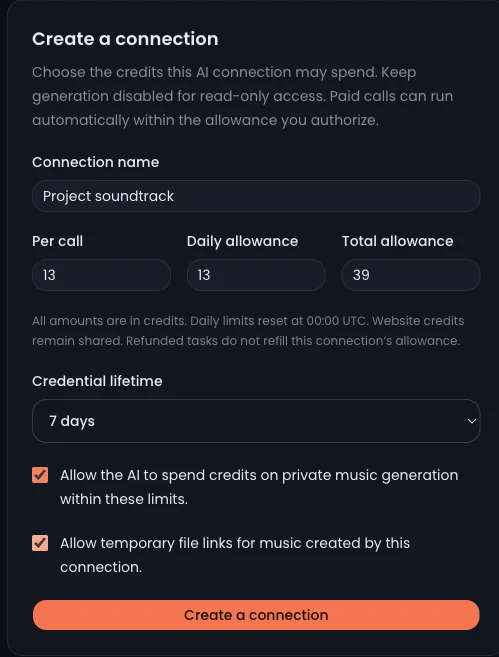
Your connections stay under your control
This real, unsaved example shows dedicated-credential settings. OAuth also creates a connection with the permissions and limits you approve. Manage or revoke either kind in AI connections. Creating one does not add or reserve credits.
Open AI connectionsMusic generation credits and connection limits
Account queries and quotes do not use credits. A new music generation currently costs 13 credits. Your balance and your connection limits must both cover the quote.
Estimated generation credits
Estimate only. This control does not call the service or generate music. The service quote is authoritative.
- Account balance
- The credits available in your website account. A connection does not grant or reserve them.
- Connection limits
- Per-call, daily and lifetime ceilings on what this credential may spend. Daily limits reset at 00:00 UTC.
- Within your allowance
- Depending on your client settings, the assistant may submit automatically within the allowance. Choose limits you are comfortable delegating.
Private music, with clear account rights.
The quote shows privacy, retention and license information. Your plan and the music’s access rights determine which files you can retrieve.
- Private at creation
- This MCP beta requires private-generation rights and never falls back to a public showcase generation.
- One connection, its own tasks
- Each credential has separate permissions and can query only the tasks created by that connection.
- Links expire; retention is separate
- File links last at most five minutes. While the connection is valid, query the same task for new links. The song’s retention follows its purchased rights.
- Revoke the connection
- Revocation blocks new calls and file links. An already submitted generation may continue, and files already downloaded remain on your device.
Keep the task, even when the session ends.
A submitted generation has a durable task ID. Use it to continue checking the same request and retrieve files when they are ready.
- Brief
- Quote
- Submitted
- Processing
- Files ready
The assistant disconnected or the task is still processing
Reconnect with the same valid credential and check the existing task ID. A slow or interrupted response is not a reason to create another generation.
The file link has expired
Query the same task for a fresh link while your credential and file access remain valid. This does not create a new music purchase.
Account queries work, but generation is unavailable
Check private-generation rights, available credits, generation permission and all three budget limits. File links also require download permission.
The credential is revoked or expired
Manage your credentials on the website. Your original music remains in Library according to its retention. A new connection cannot read an old connection’s tasks.
Files are pending or delivery failed
Follow the task’s retry guidance for pending files. For a delivery failure or access restriction, open Library for recovery or the applicable file rights. Keep the original task.
Music MCP questions
Which clients can I use?
The server supports Streamable HTTP with OAuth 2.1 or a dedicated bearer credential. Setup guides cover ChatGPT, Claude Code, Codex, Cursor and VS Code. Available entry points depend on your client, account and workspace policy.
Do I need another MCP subscription?
MCP uses your existing account credits and plan rights. Creating a connection has no separate credit charge. Music generation needs private-generation plan rights and enough credits.
Can I connect before I have generation credits?
Yes. Leave generation and download disabled when creating a read-only connection, then check your account. To generate later, create a connection with the required permissions and allowance.
Is the result always two tracks or an exact length?
No fixed output count or exact duration is guaranteed. The example above is one completed test. Check the ready files returned by your own task.
Does a refund refill my connection’s allowance?
A task refund can return account credits, but does not refill the connection’s spent allowance. Review the existing task and create a newly budgeted connection only when you intend to authorize further spending.
Does a quote reserve my balance?
No. A quote lasts ten minutes and shows the current cost and rights. Balance, rights, permissions and limits are checked when the quoted generation is committed.
Where can I listen and download?
Use your website Library to play the music, or retrieve permitted files through the task links. Playback inside an AI client depends on the client; this MCP returns task and file information.
Can I put the credential in a shared config file?
For OAuth, sign in on AIGenMusic and approve a scoped connection. For dedicated credentials, keep the placeholder or secure-input reference in the client config. Manage and revoke both kinds in AI connections.
Developer reference: four focused tools
| Tool | What it does |
|---|---|
music_get_account | Read balance, eligibility and spending allowance. No credits used. |
music_prepare_generation | Return a quote and draft ID without spending. Reuse the request ID for the same brief. |
music_commit_generation | Submit that draft within the allowance. Reusing the same draft returns its original task. |
music_get_task | Read this connection’s task and ready file links. Respect the returned polling guidance. |
Give your next project its soundtrack.
Set an allowance you control, connect your AI assistant, and start with a brief.