
Read the estimate and its range
Choose one MP3 or WAV. Check the tempo, key, and analyzed range before using the result. A whole-track summary is a starting point; it may miss changes between sampled sections.
KNOW YOUR SOUND
Find the tempo and musical key of your audio. Choose a track, read the estimates, and take your next idea into the studio.
or drop one file here
MP3 or WAV · Up to 25 MiB · 1 second–10 minutes · Auto analysis from 8s
Your audio stays on your device. Analysis runs in your browser.
Your tempo and key will appear here.
Estimates are a starting point. Check by ear, especially for live music, changing keys, or complex mixes.
Choose a demo track to try tempo and key analysis.
FROM LISTENING TO MAKING
Choose one MP3 or WAV. Check the tempo, key, and analyzed range before using the result. A whole-track summary is a starting point; it may miss changes between sampled sections.
Open Check & adjust. Play a steady section with the reference beat, align it to a clear beat, and listen for drift. Try ½ or 2×, tap along, or enter a known BPM. Use Analyze this section for an 8–90 second selection.
After checking, select Use these values. Your adopted values are separate from the automatic estimate. Copy or download the report, which identifies the analysis range and adopted values. Unsaved edits are not exported.
A CLOSER LOOK
A walkthrough with the built-in House demo. These screenshots explain the controls; they are not an accuracy test on independent recordings.
Read the analyzed range and any alternative tempo or key. Treat the automatic result as a starting point.
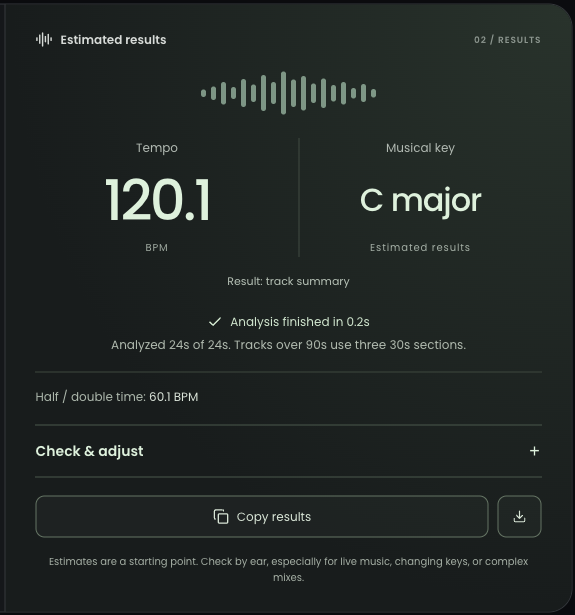
Listen, adjust, then select Use these values. A manually chosen key records your decision; it does not validate the key.
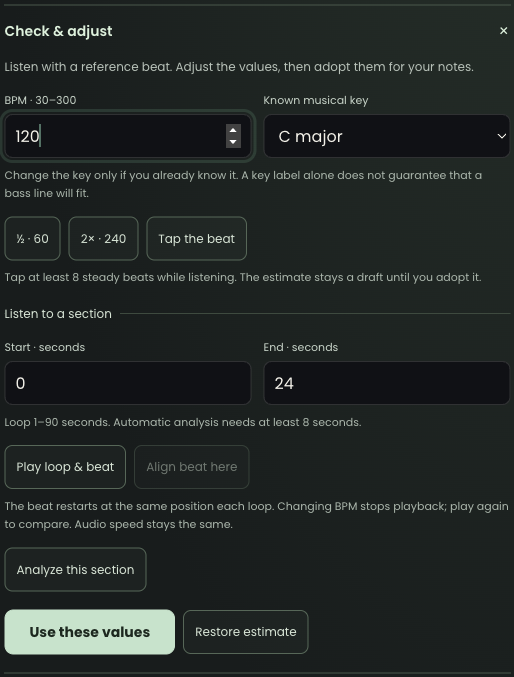
Guide checked against the current tool on September 18, 2026. Maintained by AIGenMusic.
BPM means beats per minute: it describes how fast the musical pulse repeats. A song’s key describes its tonal center, such as C major or A minor. Two songs can have the same tempo and different keys, or the same key at different tempos.
Both results are estimates. A steady beat and clear tonal instruments give the analyzer more useful information. Live timing, tempo changes, pitch shifts, key changes, and dense mixes can make the result ambiguous. A 70 BPM track may also feel like 140 BPM. Use the alternatives and your ears before arranging or mixing.
The analyzer reads your selected file locally in your browser. It does not upload the audio to our servers or send it to an AI service. Clear the tool or close the page to release the file from the tool. Example buttons download our demo audio so it can be analyzed locally.
Choose one mono or stereo MP3 or WAV, up to 25 MiB and between 1 second and 10 minutes. Automatic analysis needs at least 8 seconds; shorter clips support listening, Tap, and manual values. The analysis section above explains which parts of longer recordings are sampled.
Key and BPM describe a song’s harmony and tempo. To explore whether a recording may be AI-generated, use the AI music checker. Treat its estimate as a clue alongside the recording’s source and production history.